
Admin dashboards
Fito has two administrator dashboards: Operations, which answers is Fito working, and Content, which answers is the content working. Both read one append-only stream of recorded events and nothing else.
Most readers of this guide cannot open either page. They are gated on a flag that is set by hand in the database, and there is no request to make from the application. This page documents them anyway, so the guide covers what Fito does rather than only the parts most people reach.
Who can open these pages
Section titled “Who can open these pages”Every admin route asks one gate — AdminGate — before doing anything else. The
gate reads a stored users.is_admin flag and answers one of two ways:
| Answer | When |
|---|---|
| 401 | The credentials name no account. Sign in again. |
| 403 | The account exists and does not carry the flag. Nothing you do with your credentials will change that. |
Nothing in the application ever writes that flag. There is no admin signup, no promotion button, no bootstrap environment variable, and no seeder. An operator promotes an account by running one statement against the database, and that statement lives in the repository’s own architecture documentation rather than here.
A learner who navigates to /admin directly meets the refusal rather than an
empty dashboard:
This dashboard is for administrators. There is no request to make from here.
The refusal comes from the server. The navigation bar simply does not offer the Admin entry to an account without the flag, so the interface never opens a door onto a refusal.
Where they are
Section titled “Where they are”Two addresses, and one tab bar across the top of both.
| Tab | Address | Question it answers |
|---|---|---|
| Operations | /admin |
Is Fito working? |
| Content | /admin/content |
Is the content working? |
Operations
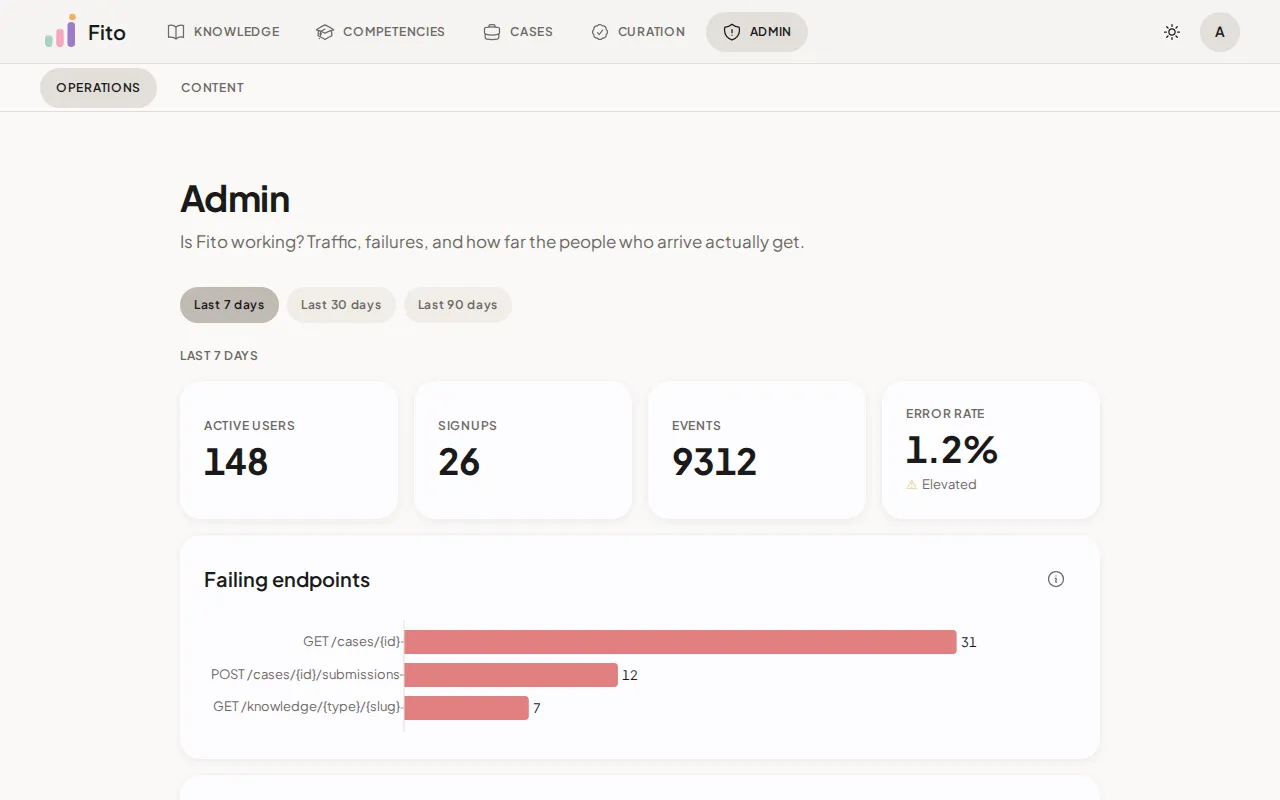
Section titled “Operations”Three blocks, each stating the period it belongs to, because they do not share one.
The window dial
Section titled “The window dial”Three preset chips — Last 7 days (the default), Last 30 days, Last 90 days. They scope the summary tiles and the failing endpoints, and nothing else.
Presets only. The window has a hard range of 1 to 90 days, and a request outside it is refused rather than quietly narrowed — a caller asking for two years and receiving one would believe the answer covered two.
Summary tiles
Section titled “Summary tiles”Four numbers, all four moving with the dial above them.
| Tile | What it counts |
|---|---|
| Active users | Distinct people who acted in the window. |
| Signups | Accounts created in the window. |
| Events | Rows the stream itself recorded in the window. |
| Error rate | Failed requests as a share of all requests, with a status word beside it. |
Events is larger than the daily totals on the traffic chart, and that is correct rather than a discrepancy. It counts the stream’s rows from both capture halves, while the chart counts requests — one signup writes a request row and a publisher row. The two answer different questions, and neither is the other’s total.
Error rate reads its own level as a word, never as a colour alone:
Healthy below 1%, Elevated from 1%, High from 5%. A window with no
requests at all reads 0% — a quiet window is not an outage.
Failing endpoints
Section titled “Failing endpoints”Counts: failed requests per endpoint in the dial’s window, worst first, at most ten.
Identity: the method and the route template together — GET /cases/{id},
never a raw path with an id in it. A request matching no catalogued endpoint
reads <unmatched>.
Each bar carries two breakdowns, because a bare failure count sends nobody anywhere:
- the statuses, worst first, each named as well as numbered —
404 Not foundand403 Forbiddenpoint at different repairs. - how many came from a robot, as a pair rather than a percentage:
0 of 17and62 of 62. Sixty-two of sixty-two from a crawler is noise; none of seventeen on a login route is seventeen people who could not sign in.
When it is empty: Nothing failed in this window.
Requests per day
Section titled “Requests per day”Counts: HTTP requests per day, split into people and robots by the user agent. Both series share one axis, because both count requests.
Window: thirty days, and it does not follow the dial. A week of columns is too few to show a rhythm, so this chart keeps its own span and pages on its own with Earlier and Later, printing the exact range it is showing.
When it is empty: No traffic yet.
The two funnels
Section titled “The two funnels”Both are lifetime, not windowed. A funnel is a conversion rate over everyone who ever arrived, and windowing one would count a single person at one stage in one window and at another stage in the next.
| Funnel | Stages |
|---|---|
| Learner funnel | Signed up → Opened a case → Submitted |
| Author funnel | Provisioned a technology → Pushed components → Drafted a case → Published a case |
The author funnel sees nothing authored before the stream began. The tables behind those four stages carry no timestamp to date an older row with, so none were backfilled.
Content
Section titled “Content”One block, and one window over all of it.
The window dial
Section titled “The window dial”Four preset chips — All time (the default), Last 7 days, Last 30 days, Last 90 days. Every section on the page moves with it, so a single period heading covers the whole page and every number on it belongs to one slice.
The default is the opposite of the Operations dial’s seven days, and deliberately so: an operations tile answers is it working right now, while a content row answers is this working at all.
Technology demand
Section titled “Technology demand”Counts: reads of a technology in the window — its own two pages, plus the listings a caller narrowed by it. Busiest first, at most ten.
Reach: every registered technology, including the quiet ones. A technology nobody browsed is a bar at zero, not a missing row. “We built for a technology nobody looks at” is as much the answer this chart exists for as the busy end is.
A bar labelled with a slug rather than a name is a technology renamed since those views were recorded. The views are real, so the bar is drawn.
When it is empty: No technologies registered yet.
Case health
Section titled “Case health”A table rather than a chart — five measures across every case is past the point where more colour helps.
| Column | What it holds |
|---|---|
| Case | The title, or the id where a case carries none. |
| Status | Published or Deprecated. A draft has no row: it is unfinished, not failing. |
| Opens | Acts. A return visit counts again. |
| Submissions | Acts, on the same rule. |
| Completion | People — evaluated over opened, the same definition the public per-case figures use. |
| Median score | The median across submissions, on the 0–3 band. |
| Median time | Wall clock from a learner’s first open to their first submission. |
Median score and Median time read —, never 0, when nothing was
measured. Zero is a grade, and a case nobody was assessed on has not earned one.
Sorting sinks those rows to the bottom in both directions, so the end you
are looking at keeps meaning what it says.
Reach: every learner-facing case, uncapped. This table’s job is to name the case that is not working, and any ranking-plus-cap hides exactly that tail. A case the window saw nothing of is a row of zeros.
Click a column heading to sort. A measure starts descending, a name starts A to Z.
Component difficulty
Section titled “Component difficulty”Counts: each component’s own mean score minus the platform average over the same window, on the 0–3 band. Negative is harder than average, positive is easier.
Reach: the ten furthest from the average in either direction, not the ten lowest, re-ordered hardest first so the bars cross the baseline once.
The baseline is the platform’s average across every component in the window, not across the ten on screen — a baseline computed from the visible rows would move whenever the cap did.
Each row also carries how many distinct learners the mean is over. An average over one learner and an average over forty are different claims, and only the second is evidence.
When it is empty: No components assessed in this window, which is also when the baseline is absent rather than zero.
The learning event stream
Section titled “The learning event stream”One append-only table stands behind every number on both dashboards, and behind the learner’s own Analytics tab. Nothing charts a live domain table.
That is the point of it. A domain table records the current state and happens to carry a timestamp; it cannot answer how many people looked at this, because looking changes nothing. The stream can, because reads are recorded too.
Two halves write it
Section titled “Two halves write it”| Half | Writes | Fills in |
|---|---|---|
| The API sweep | One row per request that reaches the application, anonymous traffic and failures included | The route template, method, status, duration, IP and user agent |
| The publisher | The facts a request cannot show — which of four identity outcomes one callback produced, the several proficiency awards one result fans out to, whether a vote was cast, switched or withdrawn | The domain detail, leaving the HTTP fields empty |
The two never share an event name, so any row is attributable to one half or the other by its type alone.
What the stream does not see
Section titled “What the stream does not see”- A request the security layer rejects before the application — an unknown path, a malformed token. It never reaches the sweep.
- Request bodies. By the time a row is written, the body is consumed. That is why several endpoints are publisher-backed at all.
- Anything that never crosses the API — actions local to the terminal, and interactions that stay inside the browser.
What a payload never carries
Section titled “What a payload never carries”Event payloads hold domain dimensions only. Never a password, never an access or refresh token, never an OAuth code or state, never a pull request URL, never submitted content, never an indication note, and never a rubric or quiz answer key.
That list is enforced by a test rather than left to review, because several of those values arrive as query parameters on routes the sweep does read.
The dashboards count their own reads
Section titled “The dashboards count their own reads”Each dashboard read writes a row into the very stream these numbers count.
The Content dashboard cannot inflate what it displays: its three reads are recorded as dashboard views and never as a browse, an open or an award. The Operations dashboard has no such property — its traffic chart counts requests, and its own reads are requests.
How numbers and dates are written
Section titled “How numbers and dates are written”Numbers and dates on both dashboards are written in en-US rather than in
your own locale — a dot for the decimal point, percentages like 1.2%, and dates
as Jul 6, 2026. That holds for every reader, whatever their browser is set to.
The three counts in the summary tiles are the exception, and it is visible: they
are printed as plain digits with no thousands separator, so a window of nine
thousand events reads 9312.
It is deliberate. The headings, axis names and status words around these numbers are English, so following the reader’s locale would have produced numbers in one language inside a card written in another.
What’s next
Section titled “What’s next”- Your learning analytics — the same stream, read for one learner about themselves.
- Work the curation catalogue — the creator’s worklist, which needs no admin flag.
- Your data and privacy — what Fito keeps about you.